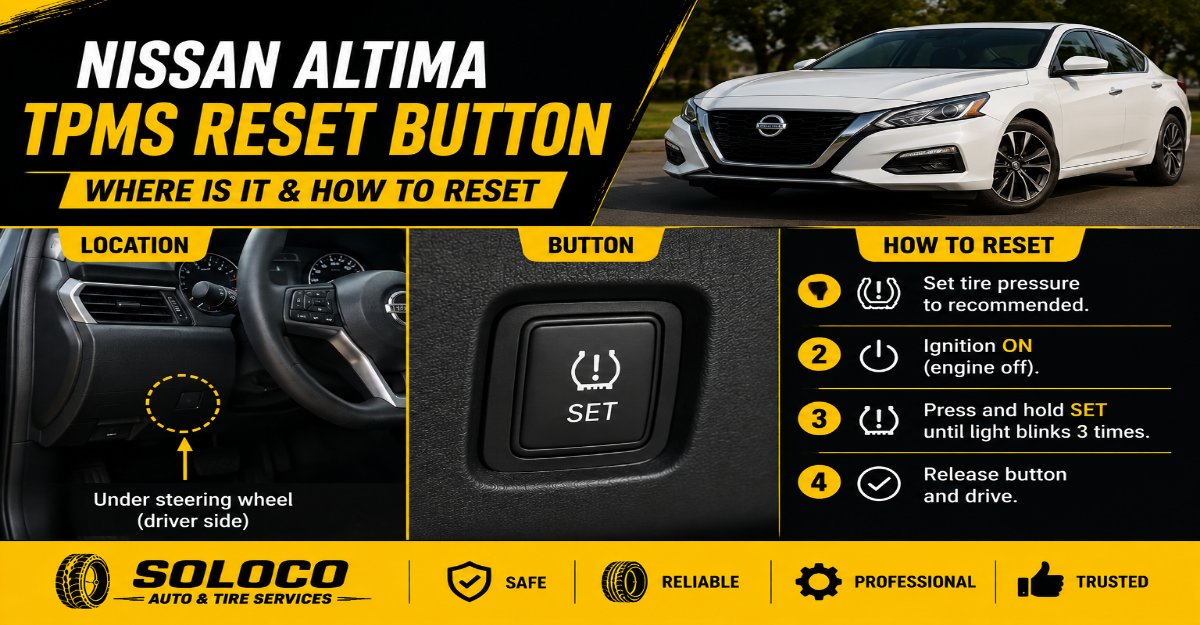
The physical Tire Pressure Monitoring System reset button on a Nissan vehicle is typically located underneath the steering wheel near the lower dashboard trim panel, or inside the glove box on select older models. However, the vast majority of modern Nissan vehicles manufactured between 2018 and 2026 do not feature a physical reset button at all, relying instead on automatic driving recalibration parameters or touchscreen infotainment menu settings.
Key Facts At a Glance
- Physical Button Locations: Underneath the steering column near the OBD2 port, or on the upper-left inside glove box compartment on older commercial and utility models.
- Modern Reset Method: Accessed via the central touchscreen infotainment system under Settings > Vehicle, or handled entirely through automatic driving recalibration.
- Target Calibration Speed: Vehicle must maintain a steady velocity between 25 and 50 miles per hour for 10 to 20 continuous minutes.
- Sensor Battery Lifespan: Sealed internal lithium-ion coin cells last between 5 and 10 years before requiring full wheel sensor replacement.
- Warning Indicator Meaning: A solid dashboard icon indicates low tire pressure or corrupted baselines, while a 1-minute flashing pattern denotes a hardware communication failure.
Where Is the Nissan TPMS Reset Button Located?
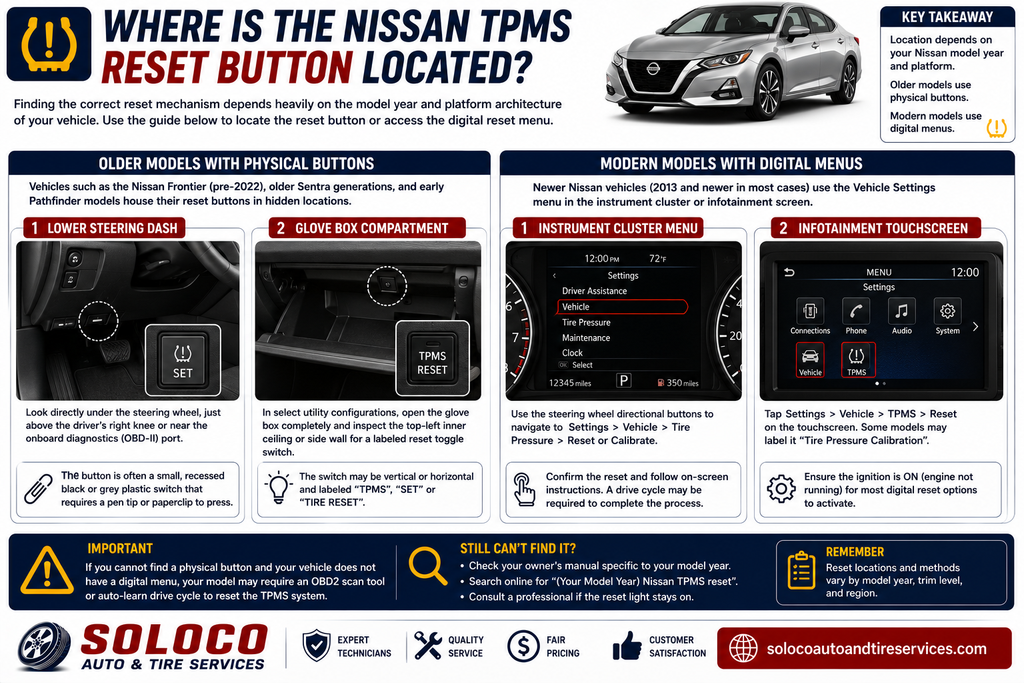
Finding the correct reset mechanism depends heavily on the model year and platform architecture of the vehicle. Older generation Nissan passenger cars and compact trucks utilized physical push-buttons to force a manual system reinitialization, whereas modern unibody crossovers and sedans have transitioned completely to digital interfaces.
Older Models With Physical Buttons
Vehicles such as the Nissan Frontier (pre-2022), older Sentra generations, and early Pathfinder models house their reset buttons in hidden locations to prevent accidental triggering by drivers.
- Lower Steering Dash: Look directly under the steering wheel, just above the driver’s right knee or near the onboard diagnostics port. The button is often a small, recessed black or grey plastic switch that requires a pen tip or paperclip to press.
- Glove Box Compartment: In select utility configurations, open the glove box completely and inspect the top-left inner ceiling or side wall for a labeled reset toggle switch.
Modern Models Without Physical Buttons
Most contemporary Nissan vehicles, including the Rogue, Altima, Murano, and Kicks produced from 2018 onward, completely omit the physical reset button. The Body Control Module manages tire pressure baselines automatically or prompts recalibration through software routines integrated into the driver assistance display or center dashboard console.
How to Reset Nissan TPMS Without a Physical Button
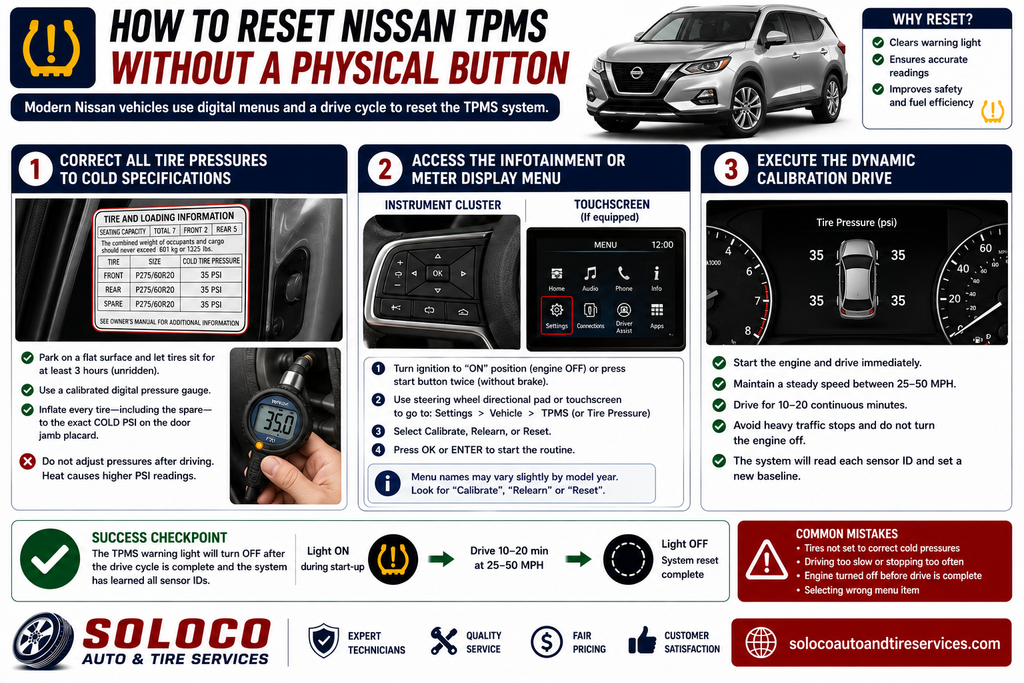
Resetting a tire pressure monitoring system on a modern Nissan that lacks a physical switch requires interacting with the digital instrument cluster or the infotainment display interface.
Step 1: Correct All Tire Pressures to Cold Specifications
Park the vehicle on a flat surface and allow the tires to sit unridden for at least 3 hours so the air inside cools down. Use a calibrated digital pressure gauge to inflate every tire—including the full-size spare if equipped on models like the Armada—to the exact cold PSI rating listed on the white placard sticker located inside the driver’s door jamb. Never adjust tire pressures immediately after highway driving, as friction heat artificially inflates internal PSI readings.
Step 2: Access the Infotainment or Meter Display Menu
Turn the vehicle ignition power to the “ON” position without starting the engine, or press the start button twice without holding the brake pedal. Use the directional pad on the left side of the steering wheel to navigate the digital instrument cluster display, or use the central touchscreen interface.
Navigate to Settings, select Vehicle, and locate the TPMS or Tire Pressure submenu. Highlight the option labeled Calibrate, Relearn, or Reset, and press the enter button to initiate the routine.
Step 3: Execute the Dynamic Calibration Drive
Once the vehicle computer registers the calibration command, start the engine and drive immediately. Maintain a consistent speed between 25 and 50 miles per hour for 10 to 20 continuous minutes without stopping in heavy traffic or turning the engine off. The Body Control Module uses this rolling period to read radio frequency identification signals broadcast by each wheel valve stem sensor, establishing a new baseline monitoring threshold.
Comprehensive Nissan TPMS System Types Comparison
| System Type | Primary Vehicle Platforms | Activation Method | Advantages | Disadvantages |
|---|---|---|---|---|
| Physical Reset Button | Older Frontier, Sentra, Maxima | Press and hold recessed dash switch for 3 seconds until light blinks. | Instant manual override without diagnostic tools. | Hidden out of sight; easy to miss calibration steps. |
| Automatic Relearn | Modern Rogue, Altima, Pathfinder | Drive continuously above 25 mph for 15 minutes. | Zero user effort required inside cabin menus. | Requires open road driving conditions without heavy stoplights. |
| Infotainment Menu | Vehicles equipped with Advanced Drive-Assist Displays | Navigate Settings > Vehicle > TPMS > Calibrate via steering controls. | Clear visual confirmation on dashboard screens. | Menu layouts vary significantly across trim levels and model years. |
| OBD2 Diagnostic Tool | Professional shops, DIY home mechanics | Connect handheld tool to diagnostic port to trigger sensor IDs. | Bypasses long drive cycles and isolates dead sensors instantly. | Requires purchasing specialized aftermarket hardware equipment. |
System Metrics, Costs, and Lifespan Specifications
Understanding the underlying operational thresholds and component costs helps vehicle owners maintain tire safety without incurring unnecessary dealership service charges.
- Target Driving Speed: Must remain between 25 and 50 miles per hour during the calibration drive cycle. Brief stops at traffic lights are acceptable, but prolonged idling forces the Body Control Module to abort the synchronization sequence.
- Sensor Battery Lifespan: OEM internal lithium coin cell batteries are hermetically sealed inside the valve stem housing and typically last between 5 and 10 years depending on climate exposure and usage cycles.
- Replacement Component Pricing: Aftermarket universal TPMS sensors cost between $30 and $70 per unit, while dealership OEM replacements range from $100 to $150 per wheel excluding labor.
- Professional Programming Fees: Independent tire shops charge between $20 and $50 to manually wake up dormant sensors using a dedicated radio frequency handheld activation tool.
Common Nissan TPMS Reset Pitfalls and Recovery Strategies
Failing to complete a successful system reset usually stems from a few recurring oversights during the inflation and calibration process.
- Ignoring the Full-Size Spare Tire: Large Nissan utility vehicles like the Armada and older Pathfinders monitor the pressure of the spare tire mounted underneath the vehicle or inside the trunk. An underinflated spare will keep the dashboard warning light permanently illuminated regardless of how many times the primary four tires are reset.
- Rushing the Calibration Drive Cycle: Stopping frequently in heavy urban traffic during the initial relearn phase interrupts the radio frequency data stream. The Body Control Module requires uninterrupted rotational velocity to log sensor IDs successfully.
- Using Incorrect Inflation Baselines: Inflating tires based on the maximum pressure stamped on the tire sidewall rather than the vehicle manufacturer placard on the door jamb creates dangerous handling characteristics and prevents proper system calibration.
Troubleshooting Persistent, Flashing, or Failed TPMS Lights
When a tire pressure warning light refuses to clear after following standard reset procedures, the issue points to specific hardware or electronic faults within the monitoring network.
Solid Warning Light Indication
A steady, uninterrupted dashboard light means that one or more tires have dropped 25 percent or more below the recommended cold inflation pressure, or the system baseline was corrupted during a previous warm-inflation attempt. Inspect all tires for slow punctures, valve stem leaks, or rim bead corrosion.
Flashing Warning Light Indication
If the dashboard TPMS icon flashes continuously for approximately 60 to 90 seconds upon vehicle startup before turning into a solid light, the vehicle has detected a system hardware failure. This pattern indicates a dead internal sensor battery, a broken radio frequency receiver module, or a disconnected wheel sensor following tire replacement work.
Performing a Hard System Power Reset
If the central computer experiences a software freeze and ignores calibration commands, perform a hard power cycle. Turn off the ignition, disconnect the positive vehicle battery cable, and hold the vehicle horn down for 3 seconds to drain residual electrical charge stored in system capacitors before reattaching the terminal.
Frequently Asked Questions
Can I reset my Nissan TPMS without driving the car?
No, modern Nissan vehicles require a dynamic driving phase to complete the calibration process. Because the wheel sensors use centrifugal motion to conserve internal battery power while parked, they only broadcast their unique radio frequency identification signals when the wheels are actively spinning above 20 miles per hour.
Why does my Nissan TPMS light come on every time the weather gets cold?
Ambient temperature directly affects air density inside pneumatic tires, causing pressure to drop by roughly 1 PSI for every 10-degree Fahrenheit decrease in outside temperature. When overnight temperatures plunge, normal tire pressure drops below the low-warning threshold, triggering the dashboard indicator until the tires are re-inflated to the correct cold PSI.
How do I use Nissan’s Easy-Fill Tire Alert feature?
Nissan vehicles equipped with Easy-Fill Tire Alert allow you to calibrate pressures without a gauge. Turn the ignition to the ON position, engage the parking brake, and begin adding air to any tire while observing the exterior hazard lights. Once the precise target pressure specified on the door placard is reached, the vehicle horn will sound once to confirm completion.
What tools do I need to program a new Nissan tire pressure sensor?
Replacing a dead sensor requires breaking the tire bead off the wheel rim to install the new valve stem assembly. Once installed, a dedicated OBD2-capable TPMS diagnostic scan tool or a dedicated radio frequency activation wand is required to write the new sensor identification codes directly into the Nissan Body Control Module.