The Nissan TPMS reset button is a dedicated control interface used to recalibrate the vehicle Tire Pressure Monitoring System after tire inflation, rotation, or sensor replacement. By triggering this system, the vehicle clears saved pressure benchmarks in the Body Control Module and establishes a new baseline from the radio frequency sensors embedded in the wheels.
Key Facts / At a Glance
- Required Drive Time: 10 to 20 continuous minutes above 25 mph to complete sensor synchronization.
- Button Locations: Underneath the lower steering column cowl, near the driver left knee, or inside the glove box.
- Solid vs. Flashing Light: A solid light indicates low pressure or calibration needed; a flashing light for 60 seconds indicates dead sensor hardware or a system fault.
- DIY Cost: Zero dollars using onboard manual buttons, menu options, or legacy chassis grounding techniques.
- Battery Lifespan: Direct TPMS sensor lithium coin cells last between 5 and 10 years or approximately 100,000 miles.
How the Nissan Tire Pressure Monitoring System Operates
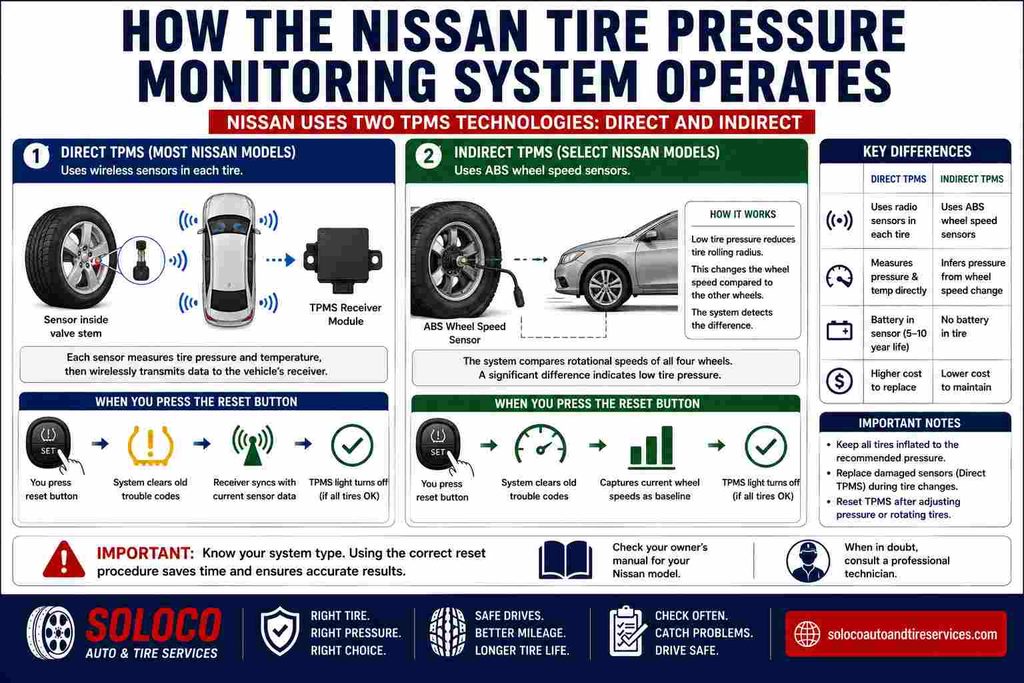
The Nissan Tire Pressure Monitoring System operates using either Direct or Indirect monitoring methodologies depending on the specific model year and platform architecture. Direct TPMS utilizes physical radio frequency transmitters mounted inside each wheel valve stem to broadcast real-time pressure and temperature data to the internal receiver module. When you press the reset button, you force the receiver to flush old trouble codes and sync with current sensor data packets.
Indirect TPMS, found on select compact and legacy Nissan platforms, utilizes the Anti-lock Braking System wheel speed sensors to measure individual tire rotational speeds. Low tire inflation pressure changes the rolling radius of the tire, which alters its rotational speed relative to the other wheels. The reset button captures the current wheel speeds as the newly approved correctly inflated benchmark. Understanding your specific vehicle architecture prevents wasted diagnostic time when attempting calibration procedures.
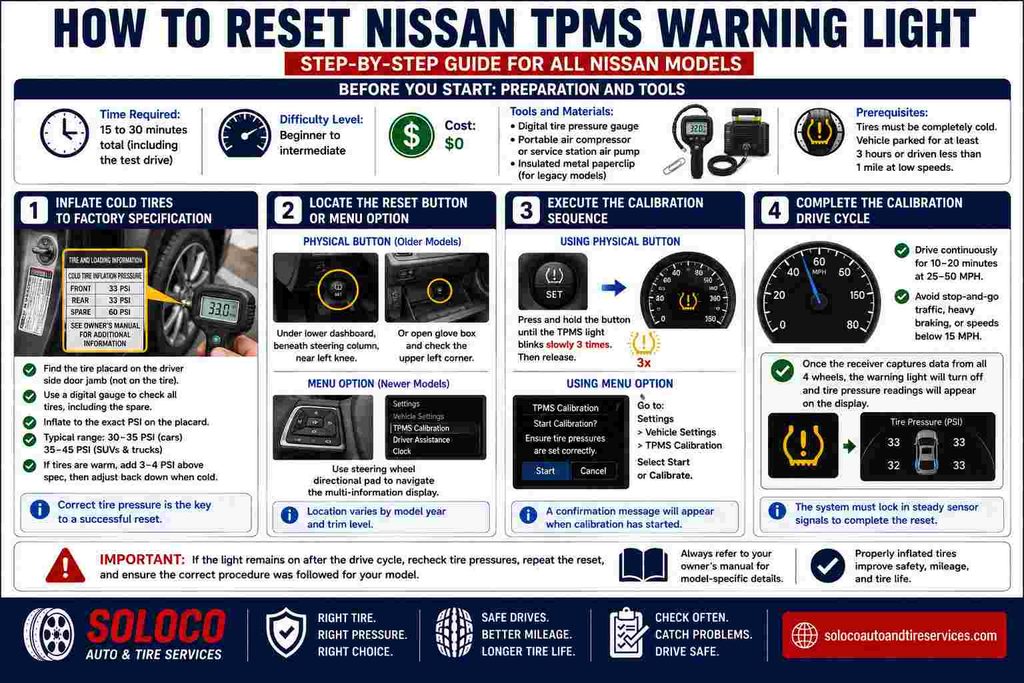
Before You Start: Preparation and Tools
- Time Required: 15 to 30 minutes total (including the required test drive).
- Difficulty Level: Beginner to intermediate.
- Cost: Zero dollars.
- Tools and Materials: Digital tire pressure gauge, portable air compressor or service station air pump, and an insulated metal paperclip for legacy models.
- Prerequisites: Tires must be completely cold, meaning the vehicle has been parked for at least three hours or driven less than one mile at low speeds.
Step 1: Inflate Cold Tires to Factory Specification
Accurate tire inflation is the single most critical factor for a successful TPMS reset. Locate the official tire placard sticker affixed to the driver side door jamb, not the maximum pressure rating printed on the tire sidewall. Use a digital pressure gauge to measure each tire, including the full-sized spare if your specific Nissan model integrates spare tire monitoring. Inflate every tire to the exact PSI value specified by Nissan, typically ranging from 30 to 35 PSI for passenger cars and 35 to 45 PSI for larger SUVs and trucks. If tires are warm from driving, add 3 to 4 PSI above the placard specification to compensate for heat expansion, then adjust them back down once fully cooled.
Step 2: Locate the Physical Reset Button or Menu Option
Locate your reset mechanism based on your specific Nissan model year and trim level. For older models equipped with a physical switch, look underneath the lower dashboard directly beneath the steering column near your left knee, or open the glove box and inspect the upper left corner. The button is usually a small recessed tactile switch labeled SET or stamped with a cross-section icon of a flat tire. For modern Nissans featuring digital instrument clusters, skip the physical search and use the steering wheel directional pad to navigate the central multi-information display settings.
Step 3: Execute the Calibration Sequence
Turn your vehicle ignition key or push-button start to the ON position without starting the engine to power up the electrical accessories and onboard computer modules. If you are using a physical button, press and hold the switch continuously until the dashboard TPMS indicator light blinks slowly three times, then release the button. If you are using the infotainment software menu, navigate to Settings, select Vehicle Settings, choose TPMS Calibration, and select Start or Calibrate. You will see a confirmation message indicating that the calibration process has successfully initiated.
Step 4: Complete the Required Calibration Drive Cycle
Drive your vehicle continuously for 10 to 20 minutes at steady speeds between 25 and 50 miles per hour to complete the data acquisition phase. Avoid stop-and-go city traffic, heavy braking, or sustained speeds below 15 miles per hour, as low speeds pause the registration process and prevent the receiver from locking in the new sensor identifiers. Once the internal receiver captures steady radio frequency transmissions from all four wheels, the warning light will extinguish, and individual tire pressure readouts will populate on your digital instrument cluster.
Common Mistakes and How to Fix Them
Why Does the TPMS Light Stay On After a Reset?
Failing to reset the system after correcting tire pressures or ignoring a hidden spare tire sensor will cause the warning light to remain illuminated. Full-sized spares on models like the Nissan Armada, Pathfinder, and Frontier contain active sensors that must also be inflated to the correct PSI. Furthermore, ambient temperature drops during seasonal transitions shrink air volume inside the tire, frequently dropping pressure below the warning threshold immediately after a reset procedure.
How Do You Diagnose a Flashing TPMS Warning Light?
If your dashboard TPMS indicator flashes continuously for 60 to 90 seconds upon starting the vehicle before remaining solid, you are dealing with a hardware failure rather than low pressure. This flashing pattern indicates a dead internal sensor battery, a broken valve stem sensor body, or an unregistered aftermarket replacement sensor that lacks proper OBD-II ID programming. Replace the defective sensor with an OEM-compatible 315MHz or 433MHz unit, then use a professional activation tool to program the new sensor ID into the vehicle computer.
Advanced Troubleshooting: The Legacy Test Port Grounding Method
Older legacy Nissan and Infiniti models lack both physical dashboard reset buttons and software infotainment calibration menus, requiring a manual chassis grounding procedure to clear stored fault memory. Locate the white single-wire diagnostic test connector taped to the main wiring harness near the OBD-II port underneath the driver dashboard. With the ignition switched to the OFF position, use an insulated jumper wire or metal paperclip to connect the terminal pin inside this white connector directly to a clean metal chassis ground point. Turn the ignition switch to the ON position while maintaining the ground connection, and watch for the TPMS light to begin slow blinking. Disconnect the jumper wire within 10 seconds while the light flashes, then turn the ignition off and start the engine to confirm the system memory has cleared.
Expert Recommendations for Nissan Owners
- For the Daily Commuter: Rely strictly on the automatic drive method or the digital instrument cluster menu. Keep a high-resolution digital pressure gauge in your glove box and verify pressures manually before taking your vehicle to a service center.
- For the DIY Home Mechanic: Invest in an entry-level handheld TPMS activation tool costing between 15 and 40 dollars. This tool allows you to manually wake up direct sensors and verify battery health after tire rotations without relying on dashboard guesswork.
- For the Off-Road Enthusiast: Utilize a bidirectional OBD-II scan tool capable of saving multiple tire profile configurations. This prevents persistent warning lights when switching between standard highway pressure and aired-down trail pressures.
Frequently Asked Questions
Can I reset my Nissan tire pressure light without driving?
You cannot fully complete a TPMS calibration without driving the vehicle if your model requires a motion-based sensor wake-up cycle. While physical buttons and menu prompts initiate the reset command, the receiver module requires rolling wheel rotation to capture active radio frequency signals and update individual pressure values.
How much does it cost to replace a Nissan TPMS sensor?
Replacing a dead TPMS sensor typically costs between 40 and 120 dollars per sensor for parts alone, depending on whether you purchase OEM Nissan components or aftermarket alternatives. Professional installation and electronic OBD-II relearn labor at a local tire shop generally adds an extra 20 to 50 dollars per visit.
Why does my TPMS light turn back on after a few days?
A recurring warning light typically indicates a slow puncture, a leaking valve core, or a cracked wheel rim rather than a faulty electronic system. Submerge the inflated wheel in water or spray soapy water around the bead and valve stem to locate micro-leaks causing pressure loss over 48-hour periods.
Will disconnecting the car battery reset the TPMS system?
Disconnecting your vehicle battery negative terminal for 5 minutes will clear temporary random access memory errors in the Body Control Module, but it will not recalibrate tire pressure thresholds. The system retains programmed sensor IDs and low-pressure calibration benchmarks in non-volatile memory, meaning proper inflation and drive cycles remain mandatory.